KwickCafe
NewAsk your POS questions in Hindi & Hinglish

The smart POS that runs your entire cafe

Billing, kitchen display, recipe-based inventory, payroll, WhatsApp marketing and GST reports for cafes and restaurants across India. One app, every counter.

  • 14-day free trial
  • GST-ready bills
  • Works offline
  • Setup in an afternoon
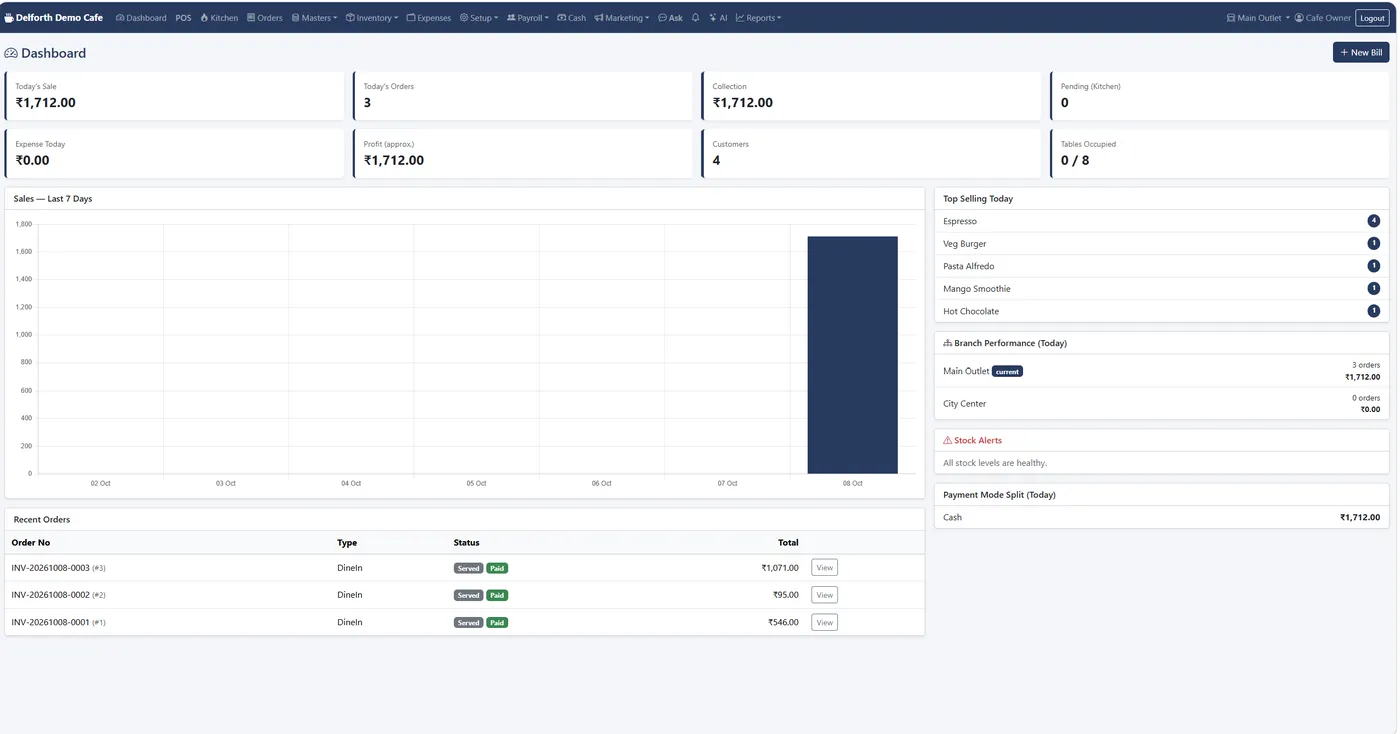
KwickCafe dashboard with today's sale, orders, collection, 7-day sales chart, top sellers and branch performance

Works with the payments and devices you already use

  • UPI
  • Razorpay
  • PhonePe
  • Paytm
  • Cashfree
  • PayU
  • Stripe
  • PayPal
  • WhatsApp
  • Thermal printers
  • Android tablets
  • Windows PCs
  • iPad
  • UPI
  • Razorpay
  • PhonePe
  • Paytm
  • Cashfree
  • PayU
  • Stripe
  • PayPal
  • WhatsApp
  • Thermal printers
  • Android tablets
  • Windows PCs
  • iPad
One platform

Restaurant POS software, made simple

Billing, kitchen, stock, staff and marketing in one place. No juggling five different apps.

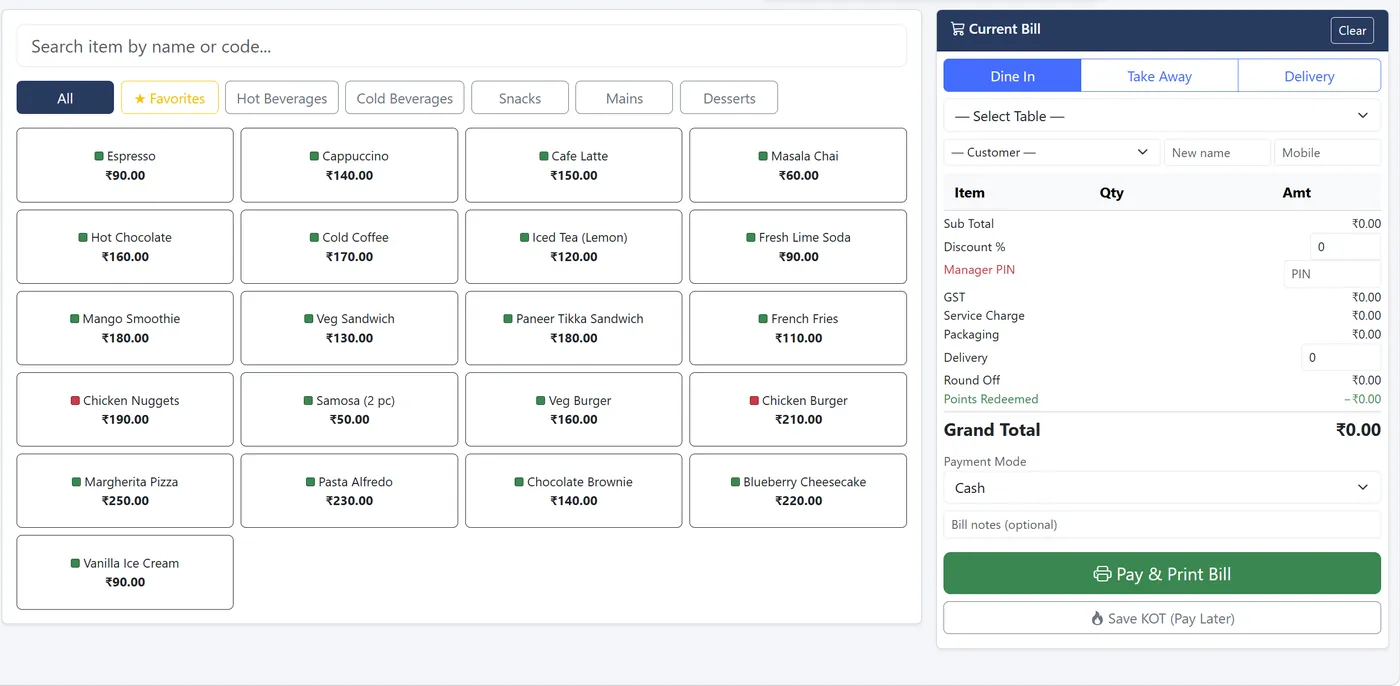
Bill a table in under a minute

Tap a category or search, choose Dine in, Take away or Delivery, and press Pay & Print. The kitchen gets the order instantly.

  • Sizes and add-ons with their own prices
  • Discounts with a manager PIN above each role's limit
  • Split payment across cash, card and UPI
  • Transfer, merge or split tables after billing
Learn more
cloud.kwickcafe.com
KwickCafe POS billing screen with menu tiles and the current bill
Features

Everything you need to run your outlet

From the first bill of the morning to the month-end GST return.

POS billing

Dine in, takeaway and delivery with KOT, split bills and split payments.

Kitchen display

Live order cards with timers instead of paper tickets.

QR table ordering

Guests scan, browse with photos and order from their phone.

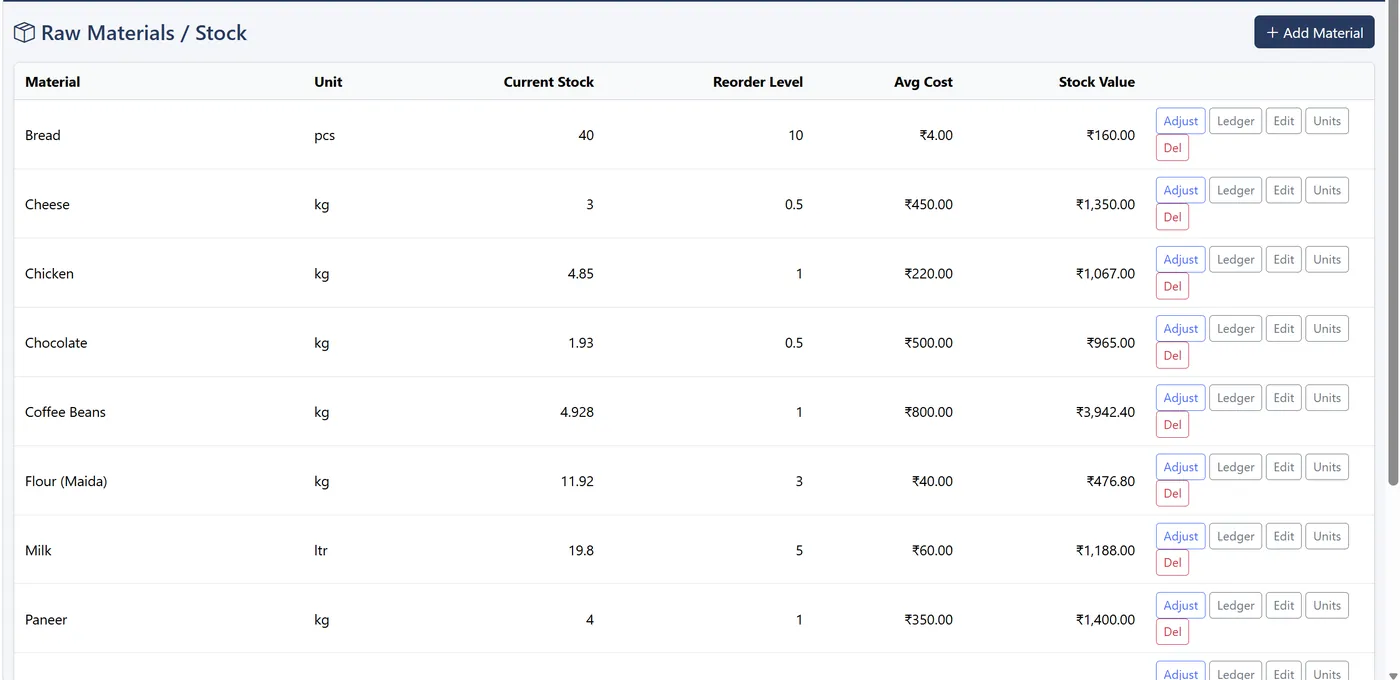
Recipe inventory

Ingredients deducted on every sale, with food cost per dish.

Purchases & suppliers

GRN in supplier units, returns and aged payables.

GST reports

CGST/SGST split and invoice-wise detail, ready for filing.

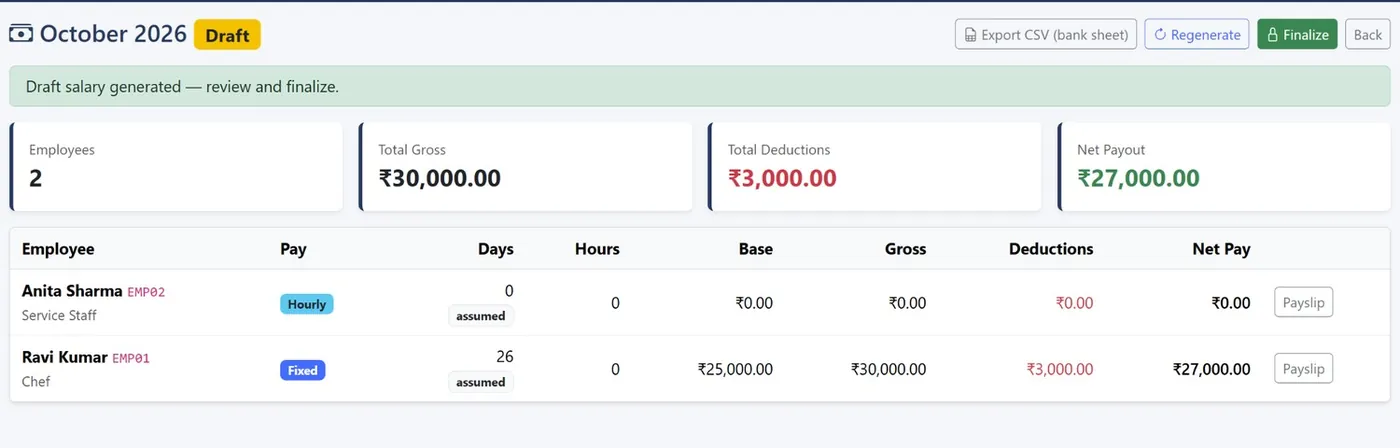
Staff & payroll

Punch kiosk, attendance register and monthly payslips.

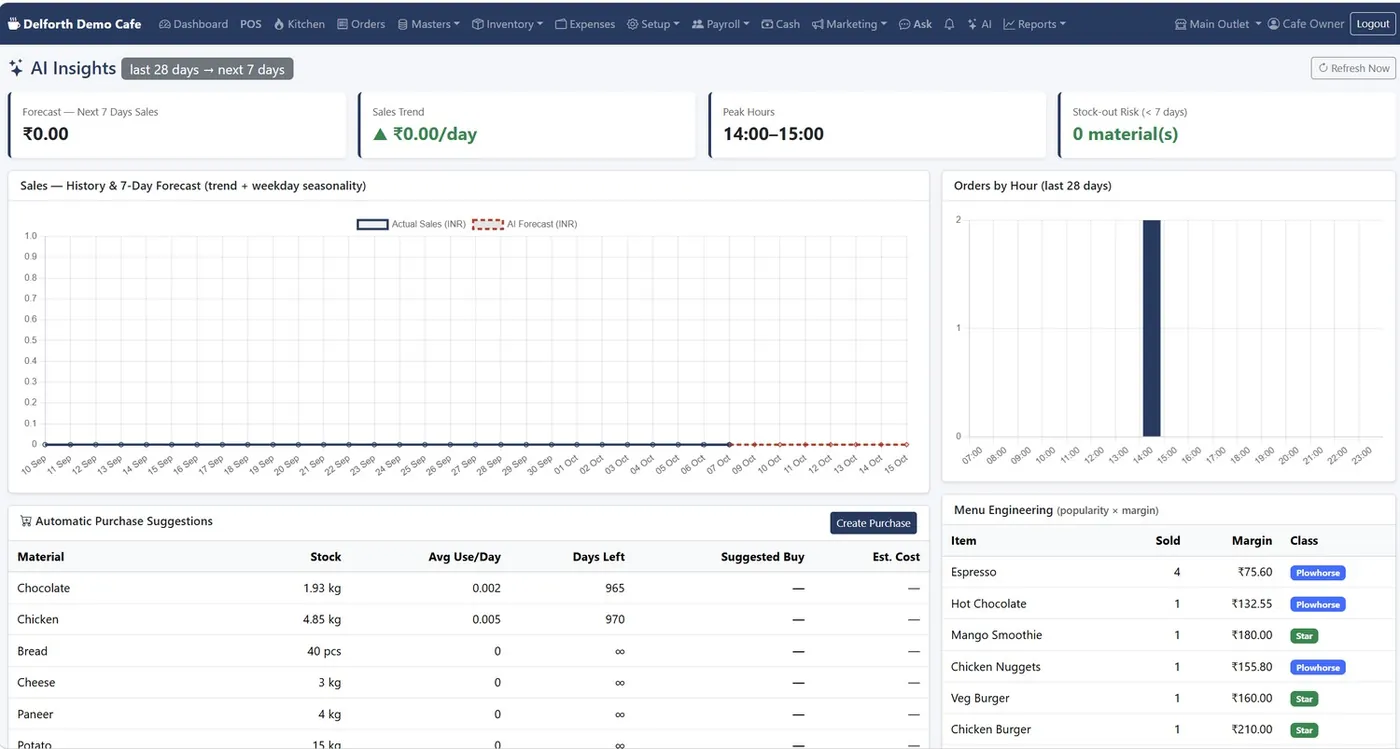
AI insights

Forecasts, peak hours, purchase suggestions, menu engineering.

WhatsApp & loyalty

One-tap receipts, campaigns, points and win-back lists.

Multi-outlet

Every branch with its own stock and kitchen, one login.

Offline + cloud sync

Keeps billing without internet and syncs when it's back.

Ask in Hinglish

“aaj ki sale kitni hui?” answered from your own data.

Explore all features

Built for you

Made for every kind of food business

Whether you sell 50 chais an hour or run five outlets, KwickCafe fits the way you work.

Cafes & coffee shops

Sizes, add-ons and loyalty for regulars.

QSR & fast food

Speed at the counter and a kitchen screen.

Bakeries & desserts

Prepared items and batch costing.

Chai, juice & shake bars

Hundreds of small bills a day, no queue.

Cloud kitchens

Delivery charges, packaging and KDS.

Chains & franchises

Every outlet in one account with transfers.

A day on KwickCafe

Open, serve, close. All on one screen.

The checklist we give every new cafe.

Opening
About 5 minutes
  1. Read the bell: yesterday versus the same weekday, low stock, unpaid bills.
  2. Send someone to buy what's red in stock alerts.
  3. Hide what you can't serve today from POS and the QR menu.
  4. Open the cash drawer with your float.
During service
All day
  1. Bill from POS and take the customer's mobile for loyalty.
  2. The kitchen moves tickets: cooking, ready, served.
  3. Record petty cash out with a reason.
  4. Record wastage while the reason is fresh.
Closing
About 10 minutes
  1. Settle open bills under Orders.
  2. Blind-count the drawer and close the shift.
  3. Print the Z-report and add expenses.
  4. The daily briefing reaches the owner on WhatsApp.
Inventory control

Find out where your stock actually goes

Most cafes lose money between the store room and the plate. KwickCafe closes that gap in four steps.

  1. Buy

    Enter purchases in supplier units like “2 bags at ₹1,200”. Exact grams and cost are stored.

  2. Sell

    Each bill deducts its recipe from the outlet that sold it, at weighted average cost.

  3. Count

    Count the shelf monthly. Sales during the count don't distort it.

  4. Find

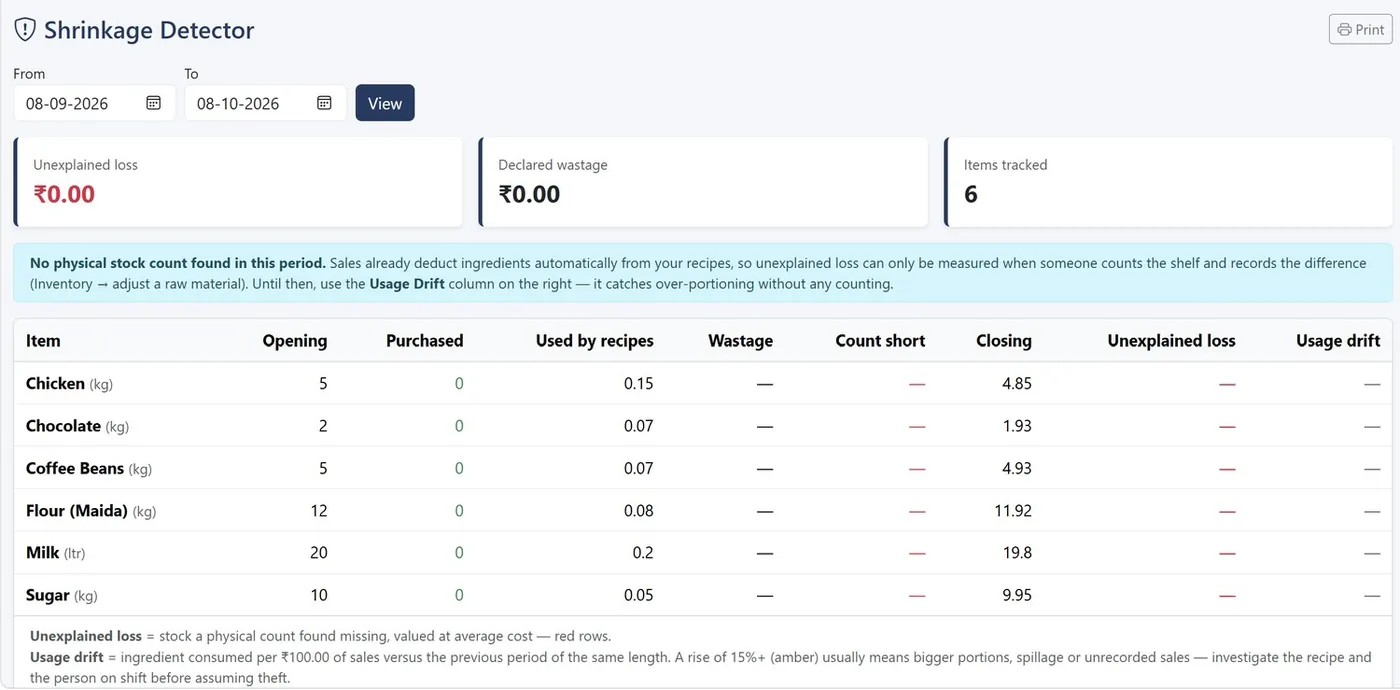
    The shrinkage detector shows stock that left without a bill, and over-portioning drift.

How inventory works
cloud.kwickcafe.com
Shrinkage Detector report with opening, purchased, used by recipes, wastage, closing, unexplained loss and usage drift
Ask KwickCafe● Works offline
aaj ki sale kitni hui?
Today's sales: ₹1,712 from 3 bills. Espresso is the top seller with 4 cups.
stock mein kya kam hai?
Nothing is below its reorder level. Lowest cover is Chocolate, 1.93 kg.
change price of Cappuccino to 150
Cappuccino: ₹140 → ₹150. This will be saved to the audit log.
ConfirmCancel
AI assistant

Ask your cafe a question, the way you'd ask your manager

Type or speak in English, Hindi or Hinglish. Answers come from your own sales, stock, expenses and staff data.

  • Make changes like prices or availability, only after you confirm
  • Teach it your words: “chai” means Masala Chai
  • Press Ctrl + K on any screen to ask
Security & control

Built so money and stock can't go missing quietly

The controls owners ask for after the first bad month are already switched on.

  • Blind cash countCashiers enter what's in the drawer before they see what's expected.
  • Manager PIN for big discountsEach role has its own discount limit; anything above needs a PIN.
  • Void, never deleteMistaken bills are voided with a reason and logged.
  • Sixteen permissions per roleAdmin, Manager, Cashier and Kitchen get only what they need.
  • Full audit logSee who changed a price, voided a bill or opened a drawer.
  • No double billsEvery synced bill has a unique ID, so a retry can't duplicate it.
Pricing

Simple plans. 14-day free trial on every one.

Prices exclude GST (18% added at checkout). Paying early never loses days.

Starter

One cafe that wants billing, kitchen tickets, stock and reports done properly.

₹999 / month

or ₹9,990 a year (save ₹1,998)

  • 1 outlet, 3 users
  • POS billing, KOT and kitchen display
  • Recipe-based inventory and purchases
  • GST, sales and stock reports
  • Smart Insights (AI pack)
  • WhatsApp receipts and campaigns
  • Offline billing with cloud sync
  • Payroll and attendance
Start free trial Talk to sales about Starter
Most popular

Growth

A busy cafe or a small chain that markets on WhatsApp and can't stop billing when the internet drops.

₹2,499 / month

or ₹24,990 a year (save ₹4,998)

  • 3 outlets, 10 users
  • Everything in Starter
  • WhatsApp receipts and campaigns
  • Offline billing with cloud sync
  • Branch transfers and branch performance
  • Payroll and attendance
Start free trial Talk to sales about Growth

Enterprise

Multi-outlet chains that want staff, payroll and every outlet in one account.

₹6,999 / month

or ₹69,990 a year (save ₹13,998)

  • 99 outlets, 99 users
  • Everything in Growth
  • Payroll and attendance kiosk
  • Salary runs, payslips and bank sheet export
  • Every outlet in one account
Start free trial Talk to sales about Enterprise

Compare plans feature by feature

FAQ

Questions cafe owners ask us

Still unsure? Ask us on WhatsApp and a real person will reply.

Does KwickCafe keep billing when the internet goes down?

On the Growth and Enterprise plans, yes. KwickCafe runs on the cafe PC, so billing, printing and the kitchen screen carry on without internet. Bills queue on the PC and sync to the cloud on their own when the connection returns, and each bill carries a unique ID so a retry never creates a duplicate. The Starter plan runs in the cloud through your browser.

Is KwickCafe GST compliant?

Yes. You choose whether menu prices include GST or have it added on top, set a GST rate per item, and print your GSTIN on every receipt. The Tax Report gives a rate-wise summary split into CGST and SGST, plus invoice-wise detail, ready for filing.

What hardware do I need?

Any Windows PC, laptop, tablet or phone with Chrome or Edge, and a standard thermal receipt printer. Tablets on the same Wi-Fi can act as extra counters or the kitchen screen. You can install KwickCafe like an app from the browser's address bar.

Can I send the bill to customers on WhatsApp?

Yes. The WhatsApp Receipt button opens WhatsApp with the bill already typed, with no Meta account or setup needed. If you connect the WhatsApp Business API, receipts go automatically after every bill. Each receipt includes a private link the customer can open, print or save as PDF.

How does stock reduce automatically?

Add a recipe (bill of materials) for a dish once. Every time that dish is billed, its ingredients are deducted from the outlet that sold it at weighted average cost, which also gives you true food cost and gross profit.

Can I run more than one outlet?

Yes. Growth covers 3 outlets and Enterprise up to 99. Each outlet keeps its own tables, kitchen, orders, stock and expenses, while the menu, customers and settings are shared. Stock moves between outlets with branch transfers and a printable challan.

How do I stop staff misusing discounts or voids?

Each person gets their own login and role. You choose sixteen individual rights per role, set a maximum discount per role, and require a manager PIN above it. Voids, refunds and discounts are recorded with who, when and why in the audit log, and the cash drawer uses a blind count.

Is there a free trial?

Yes, 14 days. Register with your cafe details, verify the six-digit code sent to your email, and start billing. Plans start at ₹999 a month plus GST after the trial.

Which payment methods can customers use?

Cash, card, UPI, wallet and online, including split payments. For QR orders you can add UPI Direct (a UPI QR with no gateway fee), Razorpay, PhonePe, Paytm, Cashfree, PayU, Stripe or PayPal, and the money goes into your own account.

Can my staff use it in Hindi?

The built-in assistant understands Hindi and Hinglish. Staff can type questions like “aaj ki sale kitni hui” or “stock mein kya kam hai” and get answers from your own numbers.

Ready to run a smarter cafe?

Start free for 14 days, or let us set it up with your menu on a call.

Free demo

See KwickCafe on your own menu

Tell us a little about your cafe. We'll set up a 20-minute demo with your items, your tax setup and your outlets, on a call or on WhatsApp.